
What Is The History Of Networking Technology ?
Table of Contents
- History of Networking Technology: From ARPANET to Modern Networks
- Early Computer Networks and ARPANET
- Evolution of Networking in the 1970s and 1980s
- The Rise of the Internet in the 1990s
- Who Invented the Internet?
- How Does Ethernet Work?
- Who Designed Ethernet?
- Difference Between Ethernet and Wi-Fi
- How to Build an Ethernet Connection
- What Is DHCP?
- Common Ethernet Standards
- Final Thoughts
History of Networking Technology: From ARPANET to Modern Networks
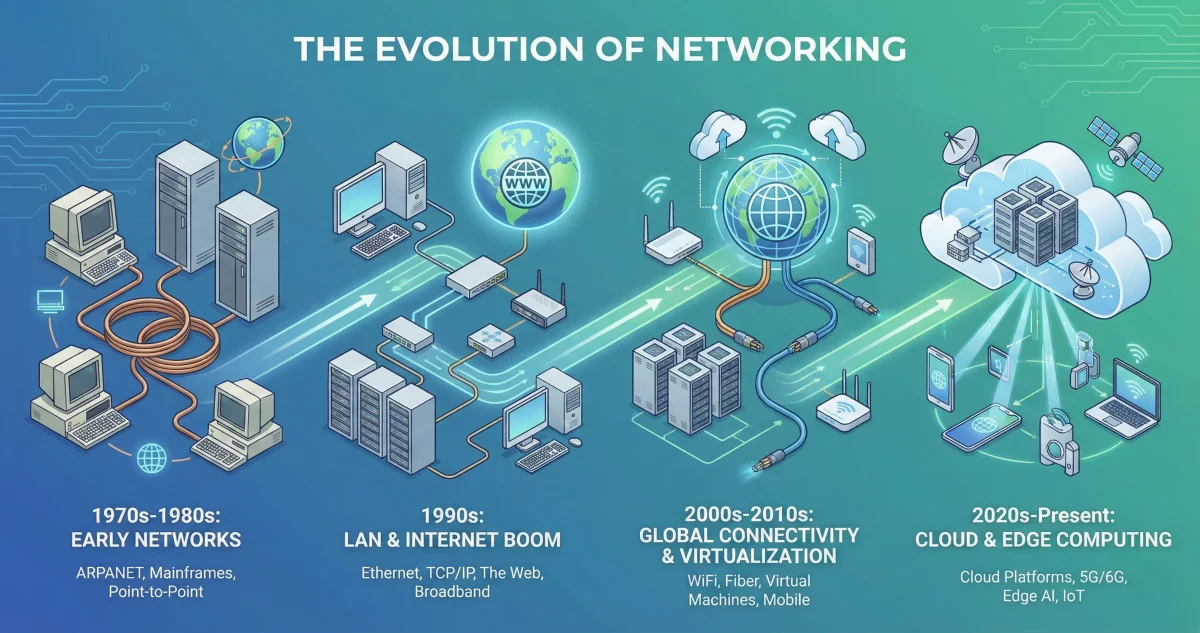
The history of networking technology is one of the most important developments in modern computing. Over the decades, computer networks have evolved from simple experimental systems into the powerful global infrastructure that supports the internet, cloud computing, communication, and digital business today.
Understanding how networking evolved helps us better appreciate technologies such as Ethernet, Wi-Fi, DNS, and the Internet itself.
Early Computer Networks and ARPANET
The foundation of modern networking began in the 1960s with the creation of ARPANET, the first operational packet-switching network. Developed by the U.S. Department of Defense, ARPANET introduced the concept of breaking data into small packets and transmitting them across multiple paths.
This innovation made data transfer more reliable and efficient and laid the groundwork for what would eventually become the Internet.
Evolution of Networking in the 1970s and 1980s
During the 1970s, Xerox introduced Ethernet, a revolutionary networking technology that allowed multiple computers to communicate over a shared medium. Ethernet quickly became the standard for Local Area Networks (LANs).
In the 1980s, personal computers became widespread, and client-server computing replaced large centralized systems. During this time, TCP/IP emerged as the standard communication protocol, enabling different networks to connect with each other.
Another major milestone was the introduction of the Domain Name System (DNS), which made it possible to access websites using human-readable names instead of numeric IP addresses.
The Rise of the Internet in the 1990s
The 1990s marked the explosion of the Internet with the invention of the World Wide Web. This made online information easily accessible to the public and led to the rise of email, e-commerce, online gaming, and social networking.
Technologies such as fiber optics, broadband internet, and wireless networking significantly increased data transmission speeds and global connectivity.
Who Invented the Internet?
The Internet was not invented by a single person, but Vint Cerf and Bob Kahn are widely recognized as the fathers of the Internet.
In 1974, they introduced the Transmission Control Protocol (TCP) and Internet Protocol (IP), which became the foundation of modern internet communication. Their work allowed different networks to communicate seamlessly, forming the global Internet we use today.
How Does Ethernet Work?
Ethernet is a networking technology that allows devices to communicate over a Local Area Network using wired or wireless connections.
It works by dividing data into small units called frames. These frames include source and destination addresses along with error-checking data to ensure accurate transmission.
Ethernet supports multiple media types such as:
-
Twisted pair cables
-
Fiber optic cables
-
Wireless transmission
Today, Ethernet supports speeds ranging from 10 Mbps to 400 Gbps, making it one of the most reliable networking technologies available.
Who Designed Ethernet?
Ethernet was developed in 1973 by Robert Metcalfe and David Boggs at Xerox PARC. It was inspired by the ALOHAnet radio network system.
The technology was standardized in 1980 and later adopted as an IEEE standard in 1985. Since then, Ethernet has become the most widely used LAN technology in the world.
Difference Between Ethernet and Wi-Fi
Ethernet and Wi-Fi serve the same purpose but function differently.
Ethernet uses physical cables, providing faster, more stable, and more secure connections. It is ideal for desktops, servers, and offices where reliability is critical.
Wi-Fi uses wireless signals, making it more convenient and flexible for mobile devices. However, it is more susceptible to interference and speed fluctuations.
Performance depends on several factors including device quality, distance, network traffic, and environmental interference.
How to Build an Ethernet Connection
To set up an Ethernet connection, you need an Ethernet cable and a router or modem.
Connect one end of the Ethernet cable to the router’s LAN port.
Plug the other end into your computer’s Ethernet port.
On Windows, go to Network Settings and check Ethernet status.
On macOS, go to System Preferences and select Ethernet.
If the status shows “Connected,” your Ethernet connection is working properly.
What Is DHCP?
DHCP stands for Dynamic Host Configuration Protocol. It automatically assigns IP addresses and network settings to devices connected to a network.
This eliminates the need for manual configuration and helps prevent IP conflicts. DHCP works on a client-server model where the server assigns and manages IP addresses dynamically.
Common Ethernet Standards
Some of the most widely used Ethernet standards include:
10BASE-T supports 10 Mbps over twisted-pair cables
100BASE-TX supports 100 Mbps and is commonly known as Fast Ethernet
1000BASE-T supports 1 Gbps and is used in modern networks
10GBASE-T supports 10 Gbps over copper cables
1000BASE-X uses fiber optics with long-distance support
10GBASE-SR and 10GBASE-LR support high-speed fiber connections
802.11 represents Wi-Fi standards used in wireless networking
Each standard varies in speed, cable type, and distance support.
Final Thoughts
Networking technology has come a long way from ARPANET to today’s high-speed Ethernet and wireless networks. Understanding how these technologies work helps individuals and businesses build reliable, secure, and efficient networks.
If you’re working with networks, domains, or servers, you can also explore Toolszu’s helpful utilities such as:
-
DNS Lookup Tool
-
IP Address Checker
-
Server Status Checker
-
Network Speed Tester
-
Website Uptime Monitor
These tools make managing and analyzing networks easier and more efficient.