
Screenshot Background Maker
Transform boring screenshots into stunning visuals with gradients, shadows, and perfect padding.
Real-Time Screenshot Editor Interface
Transform raw screenshots into social-media-ready graphics instantly. Adjust spacing, corners, and colors with live visual feedback.
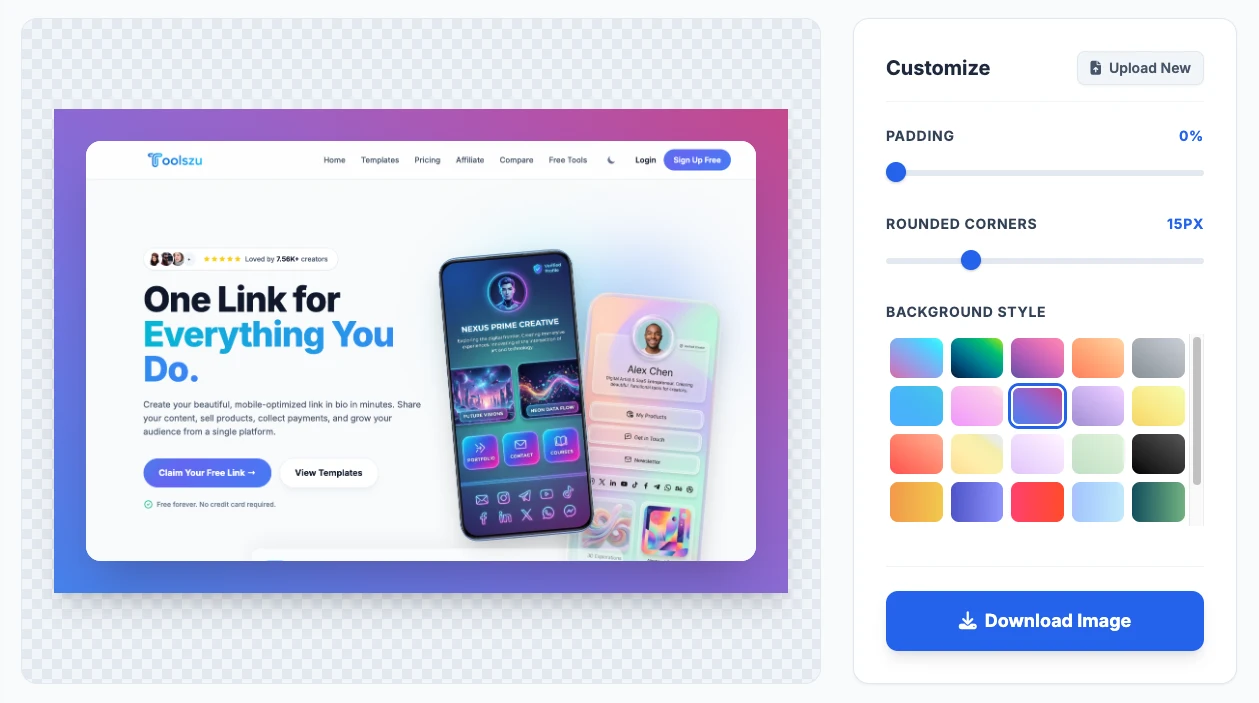
1. Smart Padding Control
Use the responsive slider to add the perfect amount of inset breathing room around your screenshot, ensuring it never gets cropped on social feeds.
2. Mac-Style Rounded Corners
Soften harsh edges instantly. Adjust the border radius from 0px (sharp) up to 60px to give your web clips a premium, modern aesthetic.
3. One-Click Gradients
Choose from dozens of curated, high-contrast gradient swatches. The live preview updates in real-time without refreshing the page.
How to Add a Background to a Screenshot
Create eye-catching, professional image mockups for your blog or social media in 4 simple steps.
Upload Image
Drag and drop your raw screenshot (PNG, JPG, WebP) into the secure browser editor.
Select Gradient
Browse our curated library and click a vibrant gradient swatch to instantly apply it to the background.
Adjust Styling
Use the slider tools to increase the outer padding and curve the corners for a sleek, modern finish.
Download PNG
Click download to render and save a high-resolution, watermark-free PNG directly to your device.
Advanced Screenshot Editing Features
Built for creators who need professional, high-fidelity image mockups without expensive software.
Premium Color Gradients
Stop guessing which colors look good together. Access over 20 hand-picked, aesthetic CSS gradients that make your screenshots pop on dark and light mode feeds.
100% Local Privacy
Taking screenshots of private dashboards or financial data? Our tool renders the final image directly inside your web browser. Your images never hit our servers.
Dynamic Padding Control
Fix cramped, edge-to-edge screenshots. Our responsive slider dynamically adds uniform space around your image, giving it room to breathe.
Custom Border Radius
Apply a smooth, Mac-style rounded corner effect to sharp, rectangular Windows or Android screenshots with a simple 0-60px precision slider.
HD Image Export
Our advanced HTML canvas compiler exports your creation at 2x scale, ensuring text, UI elements, and code snippets remain crystal clear and pixel-perfect.
Zero Watermarks
We believe in providing professional tools for free. Your downloaded screenshots are 100% clean—we never force Toolszu logos or branding onto your work.
Technical Specifications
| Parameter | Specification | User Benefit |
|---|---|---|
| Security Architecture | Client-Side Local Engine | Images process locally on your device; zero data leaves your browser. |
| Supported Upload Formats | PNG, JPG/JPEG, WebP, GIF | Compatible with screenshots taken on Windows, Mac, iOS, and Android. |
| Export Format | High-Fidelity PNG | Prevents compression artifacts and blurriness when uploading to social media. |
| Export Resolution | 2x Scale Multiplier | Ensures small text and code blocks remain sharp on high-DPI (Retina) displays. |
| Padding Range | 0% to 40% Inset | Total control over background frame thickness. |
Who Uses the Screenshot Beautifier?
Founders & Indie Hackers
Stop posting raw, edge-to-edge screenshots on X/Twitter and Product Hunt. Adding a gradient frame and rounded corners increases scroll-stopping power and drives more engagement to your SaaS product updates.
Developers & Designers
Elevate your GitHub ReadMe files, Dribbble portfolios, and changelog posts. Use the padding and radius tools to give raw VS Code snippets or Figma exports a highly polished, presentation-ready look.
Content Creators & Writers
Make your blog tutorials and newsletters visually consistent. Wrapping all your software screenshots in uniform gradients and padding ties your brand aesthetic together and makes long articles easier to read.
Frequently Asked Questions
Yes! The Screenshot Background Maker is 100% free to use for unlimited personal and commercial projects. We never require account registration, and we guarantee zero watermarks on your finalized exports.
No. Your privacy is protected through local client-side processing. The image rendering happens entirely inside your own web browser. Your screenshots never leave your device, ensuring total security for financial data or confidential UI designs.
You can upload any standard image format captured by your operating system, including PNG, JPG/JPEG, WebP, and GIF. Regardless of what you upload, the final output will always be exported as a high-quality, lossless PNG.
Simply upload your image, and the editor will automatically wrap it in a frame. Scroll through the "Background Style" grid in the customization sidebar and click any of the 20+ swatches to instantly apply a beautiful color gradient.
Yes! The defining feature of macOS screenshots is their smooth, rounded corners. Just upload your sharp-edged Windows or Linux screenshot, and drag the "Rounded Corners" slider to about 12px-16px to replicate that premium Apple aesthetic.
Our tool exports your image at a 2x scale to guarantee maximum sharpness. If it appears blurry on social media, it is usually because platforms aggressively compress wide images. Using the padding slider (around 10-15%) ensures the core content stays safely in the center of the feed frame, avoiding awkward automated cropping.
Pro-Tips for Viral Screenshot Mockups
- The 10% Rule: For Twitter and LinkedIn feeds, keep the Padding slider around 10-15%. This provides enough background color to grab attention without shrinking the actual text inside your screenshot too much.
- Dark Mode Match: If your screenshot is in Dark Mode, choose a highly vibrant, warm gradient (like orange or pink). The high contrast will stop users from scrolling past your post.