
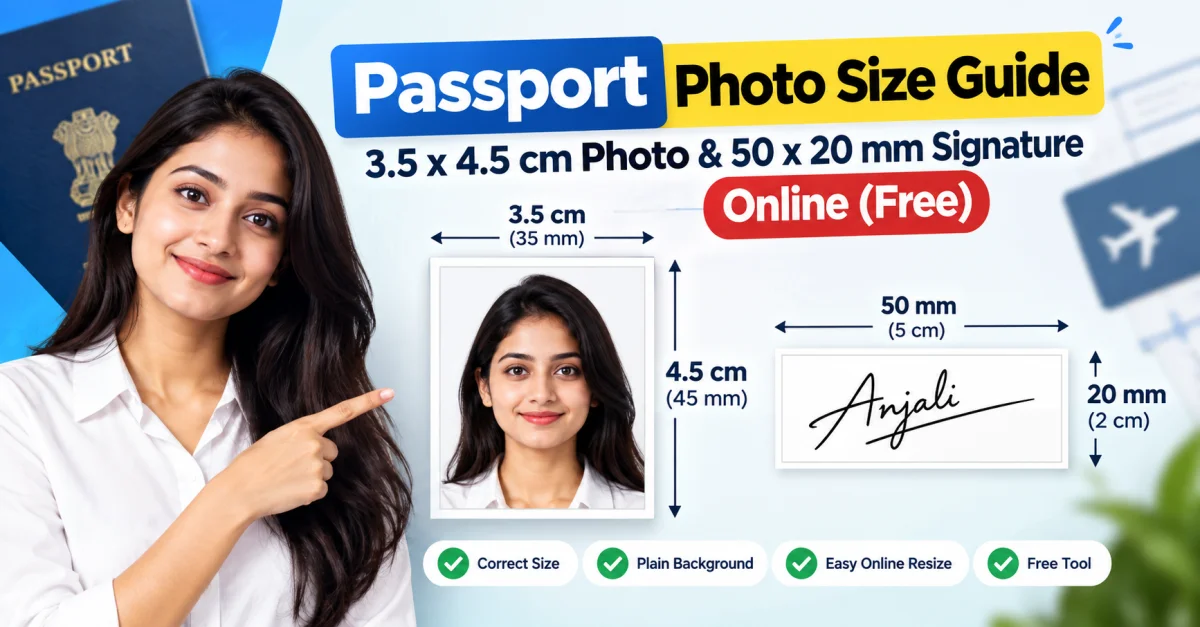
Passport Photo Size Guide: 3.5 x 4.5 cm and 50 x 20 mm Signature Online (Free)
Table of Contents
- What Is the Passport Photo Size in India?
- 3.5 × 4.5 cm Passport Photo Size Explained
- How to Resize a Photo to 3.5 × 4.5 cm Online
- What Is a 50 × 20 mm Signature Size?
- Passport Photo vs Signature Dimensions
- Common Mistakes When Uploading Passport Photos
- Is a Passport Photo Required for Every Indian Passport Application?
- How to Get a Passport Photo Ready in Minutes
- Frequently Asked Questions
- Conclusion
Getting the correct passport photo and signature size can be confusing, especially when an online application asks for exact dimensions in centimetres or millimetres. A photo that looks correct on your phone may still be rejected because it has the wrong proportions, background, or dimensions. The same issue can happen with a scanned signature.
For many Indian passport-related applications, the commonly specified photograph size is 3.5 × 4.5 cm (35 × 45 mm). Some forms may also request a signature image around 50 × 20 mm, depending on their specific requirements. The easiest solution is to resize your images online before uploading them. In this guide, you will learn the correct dimensions, how to prepare your photo and signature, and how to resize them for free.
What Is the Passport Photo Size in India?
For applications where a physical photograph is required, Passport Seva instructions specify a recent colour photograph measuring 4.5 cm in length × 3.5 cm in width. The photograph should have a plain white background, show the full face clearly, and be properly centred.
That means the standard dimensions are:
-
Width: 3.5 cm
-
Height: 4.5 cm
-
Width in millimetres: 35 mm
-
Height in millimetres: 45 mm
-
Orientation: Portrait
-
Background: Plain white
It is important to remember that requirements can vary depending on the specific application or authority. Passport Seva currently states that photographs are not required for applications submitted at PSK/POPSK, while photographs may be required for certain other collection centres. Always check the instructions for the exact service you are applying for.
3.5 × 4.5 cm Passport Photo Size Explained
The 3.5 × 4.5 cm passport photo size is one of the most commonly requested dimensions in India. It is equivalent to 35 × 45 mm.
This distinction is useful because different websites and application forms may display the same size using different units.
3.5 × 4.5 cm in millimetres
The conversion is simple:
3.5 cm = 35 mm
4.5 cm = 45 mm
Therefore:
3.5 × 4.5 cm = 35 × 45 mm
When an application asks for 35 × 45 mm, you can use the same dimensions as a 3.5 × 4.5 cm photograph.
What should a passport photo look like?
A properly prepared passport-style photograph should generally have:
-
A plain, light or white background where required
-
A clear, recent colour image
-
A front-facing view
-
The face positioned centrally
-
Eyes clearly visible
-
Natural facial expression
-
No distracting shadows
-
No excessive editing or filters
Passport Seva's published instructions also specify that the head should be centred, both edges of the face should be visible, and the photograph should be clear and printed on suitable photo paper when a physical photo is required.
How to Resize a Photo to 3.5 × 4.5 cm Online
You do not need professional photo-editing software just to change the dimensions of an image.
You can use a free passport size photo resizer to prepare your image online. Upload your photo, select the required dimensions, adjust the crop if necessary, and download the resized image.
The important part is to check the final image before uploading it to an application. Resizing alone does not automatically fix problems such as poor lighting, an unsuitable background, or a badly positioned face.
For a direct 35 × 45 mm conversion, you can also use the 35 × 45 mm image resizer to prepare an image with the required dimensions.
What Is a 50 × 20 mm Signature Size?
A 50 × 20 mm signature means the signature image should measure:
-
Width: 50 mm
-
Height: 20 mm
-
Width in centimetres: 5 cm
-
Height in centimetres: 2 cm
So, 50 × 20 mm = 5 × 2 cm.
However, signature requirements are not universal. Different government forms, recruitment portals, universities, banks, examinations, and other online applications may specify different dimensions and file-size limits.
If the application specifically asks for 50 × 20 mm, use those exact dimensions rather than assuming that every portal accepts the same signature size.
How to prepare a 50 × 20 mm signature
Start by signing naturally on clean white paper using the pen colour specified by the application. Scan or photograph the signature clearly, then crop away unnecessary empty space.
After cropping, resize the image to 50 × 20 mm while maintaining a clean and readable signature.
Do not stretch the signature excessively. If the original aspect ratio is very different from the required dimensions, crop the unnecessary white space first and then resize the image.
Passport Photo vs Signature Dimensions
Photo and signature images serve different purposes, so their dimensions should not be confused.
| Image | Common Dimensions | Equivalent |
|---|---|---|
| Passport photo | 3.5 × 4.5 cm | 35 × 45 mm |
| Signature | 50 × 20 mm | 5 × 2 cm |
| Square photo | 2 × 2 inch | 50.8 × 50.8 mm |
Always follow the dimensions mentioned by the particular application portal. A size that works for one form may not work for another.
If you need a square photograph instead, you can use a 2 × 2 inch image resizer to prepare the image in that format.
Common Mistakes When Uploading Passport Photos
Even when the dimensions are correct, an image can fail an upload check for other reasons.
Using the wrong aspect ratio
A 35 × 45 mm photograph is a portrait image. Uploading a square or landscape image and simply forcing it into the required dimensions can distort the face.
Cropping the face incorrectly
Leave enough space around the head and shoulders. Avoid cutting off the top of the head, chin, or sides of the face.
Using a busy background
A plain background is commonly required for official passport-style photographs. Passport Seva specifically mentions a plain white background for photographs submitted at applicable collection centres.
Over-editing the photograph
Avoid beauty filters, excessive sharpening, artificial facial changes, or other edits that make the photograph look substantially different from your natural appearance.
Ignoring the application's file-size limit
Correct dimensions do not guarantee that an image meets an upload portal's file-size requirement. Always check whether the application specifies a maximum file size, accepted format, or image-quality requirement.
Is a Passport Photo Required for Every Indian Passport Application?
No. The requirement depends on the application process and submission method.
Current Passport Seva instructions state that photographs are not required for applications submitted at Passport Seva Kendra (PSK) or Post Office Passport Seva Kendra (POPSK). For certain other collection centres, applicants may need to provide a recent colour photograph according to the specified requirements.
Because requirements can change, it is best to verify the latest instructions on the official Passport Seva website before preparing your documents.
How to Get a Passport Photo Ready in Minutes
The process is straightforward:
-
Choose a clear, recent photograph.
-
Make sure the face is properly positioned.
-
Use a plain background when required.
-
Crop the photograph to the correct proportions.
-
Resize it to 3.5 × 4.5 cm or 35 × 45 mm.
-
Check the final image quality.
-
Confirm the application's file format and maximum file size.
-
Upload the image to the relevant application portal.
For a quick online workflow, the online passport photo size tool can help you prepare the required dimensions without installing desktop software.
Frequently Asked Questions
What is the passport photo size in cm?
A commonly specified Indian passport photograph size is 3.5 × 4.5 cm, which is the same as 35 × 45 mm. However, requirements can differ depending on the application and submission method.
Is 35 × 45 mm the same as 3.5 × 4.5 cm?
Yes. 35 × 45 mm and 3.5 × 4.5 cm are exactly the same physical dimensions. The first measurement is simply expressed in millimetres instead of centimetres.
What is 50 × 20 mm in centimetres?
50 × 20 mm equals 5 × 2 cm. If an application specifically requests a 50 × 20 mm signature, resize the signature to those dimensions.
Can I resize a passport photo online for free?
Yes. You can use an online image-resizing tool to crop and resize a photograph to the required dimensions. Before uploading it, check the application's background, format, file-size, and other requirements.
Can I use the same photo for every application?
Not necessarily. Different government departments, examination portals, visa applications, universities, and other services can have different photo specifications. Always follow the instructions for the specific application.
Does resizing a photo make it an official passport photo?
No. Resizing only changes the image dimensions. The photograph must still meet the applicable requirements for background, framing, appearance, image quality, and other conditions.
Conclusion
Preparing a passport photograph or signature does not have to be complicated. The key is to identify the exact dimensions requested by your application and then crop and resize the image without compromising its quality.
For many Indian passport-related applications where a physical photograph is required, 3.5 × 4.5 cm (35 × 45 mm) is the specified photo size. A 50 × 20 mm signature, meanwhile, equals 5 × 2 cm, but should only be used when the particular form requests those dimensions.
If you need to prepare an image quickly, use a free online passport photo resizing tool and verify the final requirements before submitting your application.
Also Read: Best Free Resume Builder

Akash
Founder & Content Writer
Founder of Toolszu, creating practical content around technology, AI, online tools, SEO, and digital productivity. Akash focuses on building useful digital solutions and sharing insights that help people work smarter.