
Validate & Verify PDF Signature Online
Perform free PDF signature validation online instantly. Fix "Validity Unknown" yellow question marks, remove "signature not verified" warnings, and download a verified green-tick copy. Works in Chrome, Safari, and Edge.
Upload Signed Document
Drag & drop your PDF here, or click to browse
100% Secure. Files are encrypted and instantly deleted after verification.
Important Note for Successful Validation
- Do not modify or tamper with the original PDF: Always upload the exact file exactly as you downloaded it from the government platform or official portal. Using a PDF compressor, editor, or even renaming and "saving as" a new file will break the cryptographic digital signature.
- Handling Password-Protected Files: Do not try to remove the password before uploading. Upload locked files exactly as they are. Our tool will automatically detect the encryption and ask for the password to securely unlock and verify the signature.
- What if your document fails validation? If you receive an 'Invalid' or 'Tampered' result, it means the file's code was altered after signing. Please go back to the official portal, download a fresh, original copy of your document, and upload it here again.
How to Validate a PDF Digital Signature in 3 Easy Steps
Check whether a signed PDF document is genuine, legal, and unmodified without needing desktop software like Adobe Acrobat.
Upload Your PDF
Drag and drop your signed PDF file (such as an Aadhaar card, Form 16, or court order) into the secure upload box above.
Automatic Verification
Our system checks the signer's identity, verifies the timestamp, and confirms the document has not been altered or tampered with.
Online PDF Signature Validation and Download
View full signer details and immediately download a clean, verified display copy with a visible green checkmark for printing or submission.
Fix the Yellow Question Mark Instantly
See exactly how Toolszu transforms an unverified digital signature into a trusted, printable document with a valid green checkmark.
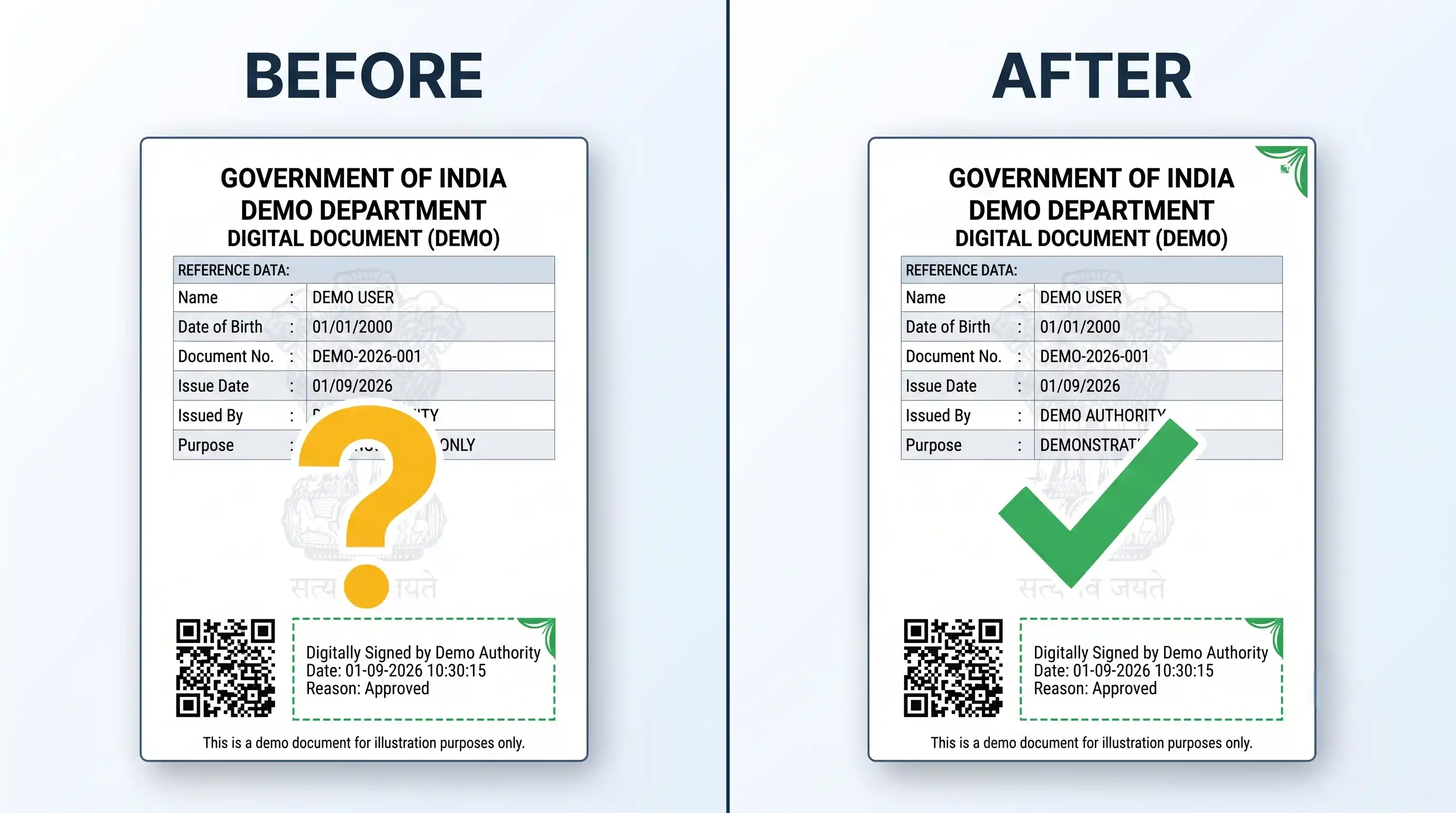
Why Does Your PDF Show a Yellow Question Mark?
When you open a government-issued PDF (like an e-Aadhaar, income tax document, or birth certificate) on your phone or computer, you will often see a yellow question mark with the message "Validity Unknown" instead of a green checkmark.
This does not mean your document is fake. Standard PDF viewers like Adobe Acrobat on mobile devices and Mac computers do not automatically include the official government root certificates (like CCA India). Because the viewer does not recognize the certifying authority, it plays it safe and shows a warning.
Toolszu resolves this problem instantly. We check the document directly against official trusted root authorities. Once confirmed authentic, we generate a verified version featuring the official green checkmark, ready for bank officers, visa applications, and government offices.
Why Use Toolszu Instead of Desktop Software?
| Feature | Toolszu (Online Validator) | Standard PDF Readers |
|---|---|---|
| Setup Required | None (Instant) | Must manually install .cer root files |
| Mobile Support (iOS/Android) | 100% Supported | Not Supported |
| Verified Print Copy | Generates flattened green-tick PDF | Prints whatever warning is on screen |
Understanding Your Signature Status
Here is what each icon and message means on your digital document.
Signature Valid (Green Tick)
The signature is 100% genuine, backed by a recognized certifying authority, and the document has not been edited or altered since being signed.
Validity Unknown (Yellow ?)
The document has a real digital signature, but the PDF reader cannot verify the certificate authority. Toolszu verifies this authority for you.
Signature Invalid (Red Cross)
The document has been changed after signing, the signature certificate has been revoked, or the file was forged. Do not accept this file.
Supported Indian Government & Business Documents
Toolszu validates cryptographic digital signatures across all central and state government portals, CCA-licensed Certifying Authorities, and DigiLocker repositories.
Identity & Personal Records
- e-Aadhaar (UIDAI) & Masked Aadhaar PDFs
- e-PAN Card PDFs (NSDL & UTIITSL)
- DigiLocker documents (Driving Licences, RCs, marksheets)
- Aadhaar eSign-authenticated PDF files
Income Tax & Banking
- ITR-V Acknowledgements & e-Filing receipts
- Income Tax Intimation Notices (including Sec 143(1))
- TRACES Form 16 / Form 16A certificates
- Digitally signed bank statements & loan sanction letters
- Digitally signed insurance policies & premium receipts
GST & Business Filings
- GST Registration Certificates (REG-06)
- GST e-Invoices, IRN-stamped PDFs & Tax Invoices
- MCA / ROC Certificates & Director DSC filings
- Udyam / MSME Registration Certificates
- GeM & e-Procurement signed tender submissions
Revenue & e-District Deeds
- Birth, Death, Caste, Income & Domicile certificates
- Land records: 7/12, 8A, Patta, Khatiyan & Property Cards
- e-Stamp certificates & registered sale deeds
- e-Courts orders, certified copies & judgments
- EPFO pension orders & UAN passbooks
Academic & University Degrees
- University Degrees, Diplomas & Provisional Certificates
- CBSE, ICSE & State Board digital marksheets
- National Academic Depository (NAD) records
- Institutional transcripts with electronic registrar stamps
All DSC Providers & Formats
- Class 2 and Class 3 Digital Signature Certificates (DSC)
- eMudhra, (n)Code, Sify, Capricorn, Pantasign & C-DAC
- Any file showing "Validity Unknown" or Yellow "?"
- Any file flagged with "Signature Not Verified" in Adobe
Why Verify Signatures on Toolszu?
Simple, dependable document validation designed for everyone—no technical experience required.
Official Authority Trust
Configured to recognize root certificates from authorized government issuers, ensuring your verification matches real legal standards.
Print-Ready Green Checkmark
Download a display copy with a crisp green checkmark that prints cleanly, preventing rejections by verification counters.
Works Great on Mobile
Adobe Reader mobile app cannot validate custom root certificates. Toolszu works right inside your mobile browser on iPhone and Android.
Confidential & Secure
Your files are processed in real-time within an isolated verification engine and are never stored, indexed, or shared with third parties.
Signer Identity Breakdown
See the exact legal name of the signing officer, their organization, and the precise date and time the signature was created.
Tamper Detection
If even a single number, name, or letter has been changed after signing, our verification alerts you that the file was modified.
Troubleshooting Common Signature Issues
- How to remove signature not verified from PDF? Standard home and office printers print exactly what Adobe displays on your screen. If your computer shows a yellow "?", the printer prints a yellow "?". Uploading your file to Toolszu and downloading our Verified Display Copy removes the "signature not verified" warning and fixes this by printing a clean green checkmark.
- My signature says "Revocation Check Failed": This happens when the issuing certificate authority server is temporarily busy or unreachable. It usually means the signature is structurally authentic, but the live server could not be contacted at that exact second.
- The tool reports "Document Modified": If anyone edited text, added a page, or used an online PDF compressor on the file after it was signed, the digital signature breaks. Always upload the original file directly downloaded from the issuing portal.
PDF Signature Validation in Mobile (Android & iPhone)
If you try to open a digitally signed PDF on an Android or iOS device, the default PDF viewers and even the Adobe Acrobat mobile app will almost always show a "Signature Not Verified" error. This is because mobile apps do not allow you to install the custom root trust certificates required by government agencies.
The Solution: You do not need a laptop to validate your document. Simply open this page in your Safari or Chrome mobile browser, upload your PDF, and our cloud-based engine will perform the PDF signature validation instantly. You can then download the verified green-tick copy directly to your phone's storage.
Frequently Asked Questions
Direct answers to the most common questions about digital PDF signature validation.
Yes, in practice many bank clerks, visa officers, and government desks demand a visible green tick mark before accepting a printed document. Even though the document itself is legally authentic, officials often do not have the time to configure Adobe certificates on their computers. Submitting our verified display copy provides the expected green checkmark without delays.
Upload your downloaded e-Aadhaar PDF into this tool and click "Validate Signature". Our system verifies the cryptographic signature directly against the UIDAI root authority and provides a downloadable display copy showing the validated green tick.
Mobile PDF reader apps (including Adobe Acrobat Reader for iOS and Android) do not support custom root trust stores. You cannot install government root certificates into mobile Adobe Reader. Using Toolszu in your mobile web browser lets you verify your documents on any smartphone without installing software.
An electronic signature is simply an image or drawing of your handwritten signature placed onto a document. A digital signature is a secure mathematical stamp backed by a cryptographic certificate issued by an authorized agency. It locks the document so any future change or tampering is instantly detected.
No. We take document privacy seriously. Your uploaded PDF is processed temporarily in volatile memory only for the seconds needed to compute the cryptographic verification. Once the result and display copy are returned, the file is automatically purged from memory. We never save, read, or share your personal documents.
The downloaded display copy is designed specifically for visual inspection, physical printing, and standard office submissions. For legal audits, court disputes, or electronic archival, we always recommend keeping your original signed PDF intact, as it holds the raw cryptographic certificate.
Yes. Any PDF with standard PKCS#7 or PAdES digital signatures (including commercial digital signature providers) can be checked for file integrity and timestamp verification.
Many official documents (like e-Aadhaar or PAN cards) are encrypted with a password for your security. If you upload a locked file, our tool will automatically detect it and prompt you to enter the password. Your password is 100% private. It is used strictly in-memory for the milliseconds required to unlock the file and verify the signature, and is never saved, logged, or stored on our servers.
Related Free PDF Utilities
Sign PDF Online
Add electronic signatures & initials
Watermark PDF
Add confidential text or logo stamps
Edit PDF Online
Add annotations, drawings & text
Compress PDF
Reduce document size without quality loss
PDF to Word
Convert PDF files to editable documents
Merge PDF
Combine multiple PDF files into one
Ready to Verify Your Document?
Check your signature validity and download your green-tick document in seconds. 100% free and private.
Verify PDF Signature Now