
How to Add Multiple Links to Instagram Bio (Step-by-Step Guide)
Table of Contents
Instagram gives you only one clickable link in your bio—and that can feel limiting when you want to promote multiple products, pages, or content. Whether you’re a creator, business owner, or freelancer, this single-link restriction can cost you traffic and opportunities.
The good news? You can easily add multiple links to your Instagram bio using smart tools and a simple setup. In this guide, you’ll learn exactly how to do it, along with best practices to maximize clicks and conversions.
Why Instagram Limits You to One Link
Instagram is designed to keep users inside the app. That’s why it restricts outbound links in posts and allows only one clickable URL in your bio.
But users today need more flexibility—especially if you:
- Run multiple campaigns
- Sell products
- Share blog posts or tools
- Promote different services
This is where a “link in bio” solution comes in.
What Is a Multi-Link Bio Tool?
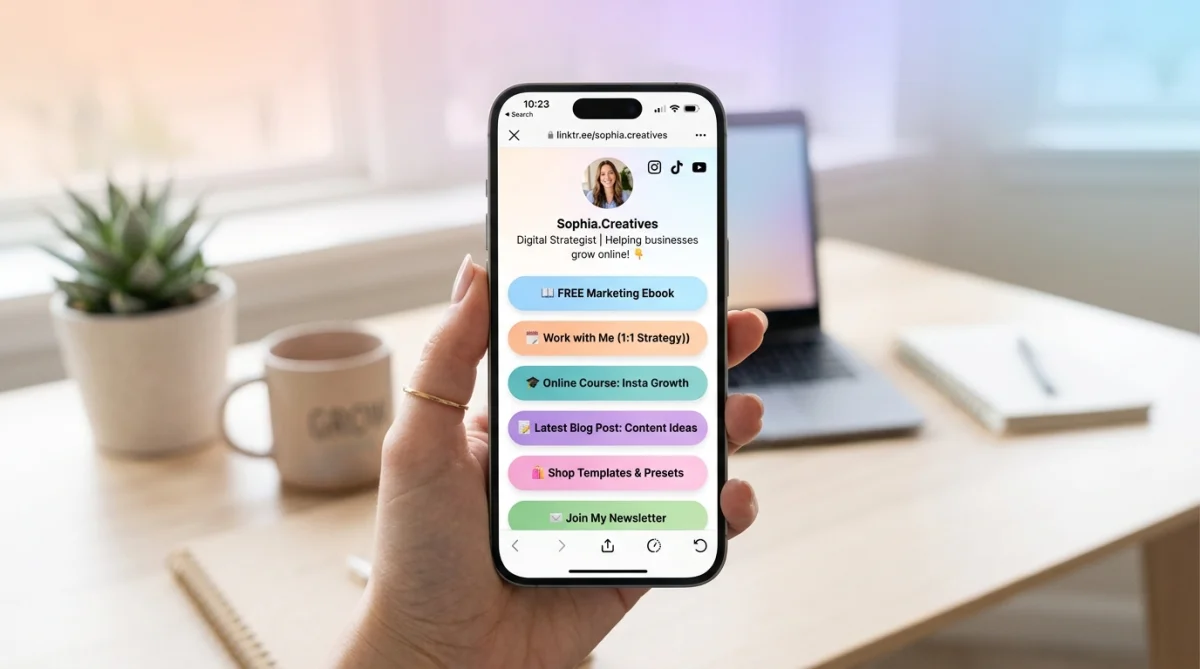
A multi-link bio tool lets you create a single landing page that contains multiple links. You place that one page link in your Instagram bio, and visitors can access everything from there.
Think of it as your mini website inside Instagram.
Instead of choosing one link, you can share:
- Website
- YouTube channel
- Products
- Blog posts
- Tools or services
How to Add Multiple Links to Instagram Bio
Step 1: Create a Multi-Link Page
The easiest way is to use a tool designed for this purpose. For example, you can create a clean and customizable link page using the
👉 Toolszu Creator
It allows you to:
- Add unlimited links
- Customize design
- Track clicks
- Keep everything organized
Step 2: Add Your Links
Once your page is created:
- Add important links first (high priority)
- Use clear titles (avoid vague text like “Click here”)
- Keep it clean and easy to scan
You can also optimize your links using a
👉 keyword suggestion tool
to match what your audience is searching for.
Step 3: Copy Your Bio Link
After setting up your page:
- Copy your unique link
- Go to Instagram → Edit Profile
- Paste it into the “Website” field
That’s it. Now your followers can access multiple links from a single bio.
Best Practices for Higher Clicks
1. Keep It Simple
Too many links can confuse users. Focus on:
- 3–7 key links
- Clear priorities
2. Use Strong Call-to-Actions
Instead of generic labels, use action-driven text:
- “Download Free Tool”
- “Start Now”
- “Get Instant Access”
3. Optimize Your Content
Before adding links, make sure your content is polished. For example, use an
👉 image optimizer tool
to ensure faster loading and better visuals.
4. Track Performance
Understanding what works is crucial. A good multi-link tool will show:
- Click counts
- Popular links
- User behavior
This helps you improve over time.
Toolszu vs Other Link-in-Bio Tools
Many users start with platforms like Linktree, but they often come with limitations—especially in free plans.
If you’re comparing options, check this detailed breakdown:
👉 Toolszu vs Linktree comparison
You can also explore a broader list of options here:
👉 best Linktree alternatives
Toolszu stands out because it offers:
- Clean UI
- More flexibility
- Free features without heavy restrictions
Alternative Methods (Without Tools)
If you don’t want to use a tool, here are some alternatives:
1. Use a Landing Page on Your Website
Create a dedicated page with multiple links and use that as your bio link.
2. Use Instagram Stories Highlights
Add links to stories (if eligible) and save them as highlights.
3. Rotate Links Manually
Update your bio link regularly—but this is inefficient and not recommended long-term.
SEO Tip: Make Your Bio Link Work Harder
Your bio link is not just a link—it’s a conversion point.
To maximize impact:
- Use clear branding
- Match your Instagram theme
- Keep loading speed fast
- Ensure mobile-friendly design
You can also follow best practices from
Google’s SEO starter guide
to improve your linked pages.
Common Mistakes to Avoid
- Adding too many links
- Using unclear link titles
- Ignoring analytics
- Linking to slow or broken pages
- Not updating links regularly
Fixing these can significantly improve your results.
FAQs
How can I add more than one link in Instagram bio?
Use a link-in-bio tool to create a single page that contains multiple links, then add that page URL to your Instagram bio.
Is using a link-in-bio tool free?
Yes, many tools offer free plans. Some advanced features may require payment, but basic functionality is often enough.
What is the best link-in-bio tool?
Tools like Toolszu Creator offer flexibility, clean design, and useful features without heavy restrictions.
Can I track clicks on my bio links?
Yes, most tools provide analytics to track clicks and performance of each link.
How many links should I add?
Keep it between 3–7 important links to avoid overwhelming users.
Does this affect SEO?
Indirectly, yes. Better link organization improves user experience, which can increase traffic and engagement.
Conclusion
Adding multiple links to your Instagram bio is no longer a challenge. With the right approach, you can turn that single link into a powerful traffic hub.
Start by creating a clean multi-link page, keep your links organized, and focus on user experience. Small improvements—like better titles or faster loading pages—can make a big difference.
If you want a simple and flexible solution, try building your link page with Toolszu and see how it improves your reach.